What does your OS look like? (Screen Shots..)

Question about which tools to use, bugs, the best way to implement a function, etc should go here. Don't forget to see if your question is answered in the wiki first! When in doubt post here.
User avatar
TimothyARyazanov
Member
Member
Posts: 89
Joined: Sat Sep 17, 2016 2:14 am
Location: Moscow, Russia

Re: What does your OS look like? (Screen Shots..)

Post by TimothyARyazanov »

pvc wrote:@TimothyWilliams I'm glad you like it :D
And you managed to port GCC, what next? Python, Assembler, web design, or what? 8)
Freedom is slavery.
War is peace.
Ignorance is strength.

Quote from 1984 by George Orwell.
User avatar
pvc
Member
Member
Posts: 201
Joined: Mon Jan 15, 2018 2:27 pm

Re: What does your OS look like? (Screen Shots..)

Post by pvc »

GCC is actually not ported. It's just sitting there and waiting. I was getting it to almost work, but not exactly. I think binutils is done but disabled for now.
User avatar
phredreeck
Member
Member
Posts: 312
Joined: Mon Jun 15, 2009 10:01 am
Location: France

Re: What does your OS look like? (Screen Shots..)

Post by phredreeck »

Hi all,

I'm back in the game. I don't know for how long, but I'm back.
Just started to work on an UEFI bootloader:
Hello, UEFI world
Hello, UEFI world
Also added multi-user features:
Multi-tasking and multi-user.
I hope to put my GUI back on my OS one day...
User avatar
Cpcdos
Member
Member
Posts: 35
Joined: Sat Feb 02, 2013 4:16 pm
Location: France [Lyon]

Re: What does your OS look like? (Screen Shots..)

Post by Cpcdos »

Hi,
I'm back after more years! :)
This is my new 2019 "co-kernel" version, able to

- Launch Win32 code files (With few NT functions)
- Launch Clang/LLVM code files
- OpenGL & GZE 3D engine + displayer
- Customizable animated bootscreen
- Multi-OS The performances remain correct
- Network UDP/TCP client server, telnet, Serial RS232
- Garbage collector
- Multi-threading
- Powerfull GUI (Checkbox, windows, progressbar, picturebox....) and console
- Include POO CpcdosC+, C/C++, BASIC programing language (Python HTML/CSS in building)
- Very few DOS dependencies


Starting + OpenGL tests 1 :
https://www.youtube.com/watch?v=k37PGs592AA

OpenGL tests 2 (2 meshs + Shadow) :
https://www.youtube.com/watch?v=85T0fYL_SVo

An example of an OS based on Cpcdos created by a young Canadian (Guillaume)
Image
His first version called "ElieOS"

Regards
FAVIER Sébastien
Sorry for my bad bad English level, I'm young French studient .. :)
cybek
Posts: 11
Joined: Tue Dec 27, 2011 4:41 pm

Re: What does your OS look like? (Screen Shots..)

Post by cybek »

Doesn't have many features in my 'os', but it's the first time I have ever created simple task scheduler and it's even working.
Two processes incrementing values in different intervals :)
Simple memory manager, which I had to debug, because it was allocating memory where my kernel exists... so many hours wasted :(
Terminal in 13h mode with pre-rendered font (took most of my kernel size, lol) with support for displaying string, hex, decimal and binary values.

I hope that someday I will have graphics mode with some window manager, etc. But don't know when, I wanted to create 16-bit OS, but decided few days ago that 32-bit may be easier. I know that I can't use BIOS, but I have whole memory without segmentation.
Attachments
first_scheduler.png
User avatar
eekee
Member
Member
Posts: 960
Joined: Mon May 22, 2017 5:56 am
Location: Kerbin
Discord: eekee
Contact:

Re: What does your OS look like? (Screen Shots..)

Post by eekee »

@cybek: That chunky text makes me nostalgic! :D I wanted to make a 16-bit OS too, but now I'm not so sure either. If I 'just' make a Forth system, I might put it into unreal mode and make a "double-indirect threaded" interpreter. With that, definitions are just lists of addresses, so interpreted code could go into 32-bit space with the data and the VESA graphics framebuffer. Only the relatively small amount of machine code would need to go in low memory. I don't know, though; got no solid OS plans at present.

BTW, everyone's experienced at least one really frustrating bug. If that was your first, welcome to the club, you're a real programmer now! ;)
Kaph — a modular OS intended to be easy and fun to administer and code for.
"May wisdom, fun, and the greater good shine forth in all your work." — Leo Brodie
cybek
Posts: 11
Joined: Tue Dec 27, 2011 4:41 pm

Re: What does your OS look like? (Screen Shots..)

Post by cybek »

eekee wrote:@cybek: That chunky text makes me nostalgic! :D
If you would like to know, it's this font: https://fonts.google.com/specimen/Press+Start+2P :)
I wanted to enable 13h mode before entering protected mode, and be able to print some text, so I was looking for pixelated font, which can be rendered as small as possible.
I'm happy that you like this font :D
I have made a program that renders whole ascii table, compress it to bitwise array and creates ASM file which can be included in kernel. It's huge compared to rest of the kernel.
I wanted to make a 16-bit OS too, but now I'm not so sure either. If I 'just' make a Forth system, I might put it into unreal mode and make a "double-indirect threaded" interpreter.
Yea, 16-bit OS feels more nostalgic, but making it is a pain. It's more difficult because of architecture, but it's easier because you have BIOS routines. 32-bit is simpler because of linear memory, but harder because of lack of BIOS. Maybe some ARM OS then? :)
BTW, everyone's experienced at least one really frustrating bug. If that was your first, welcome to the club, you're a real programmer now! ;)
Haha, thanks :D But unfortunately it's not my first bug, just recent one :)
User avatar
eekee
Member
Member
Posts: 960
Joined: Mon May 22, 2017 5:56 am
Location: Kerbin
Discord: eekee
Contact:

Re: What does your OS look like? (Screen Shots..)

Post by eekee »

cybek wrote:If you would like to know, it's this font: https://fonts.google.com/specimen/Press+Start+2P :)
Thanks! And yeah, font data is huge at this stage. It's possible to go a little smaller, down to 6x8 without merging lines, but not with style. :D Re. BIOS convenience, perhaps UEFI could make up for the lack of it? I don't want to post too much in the screenshot thread.
Kaph — a modular OS intended to be easy and fun to administer and code for.
"May wisdom, fun, and the greater good shine forth in all your work." — Leo Brodie
ozkl
Posts: 1
Joined: Sat Sep 07, 2019 1:40 am

Re: What does your OS look like? (Screen Shots..)

Post by ozkl »

Hi,

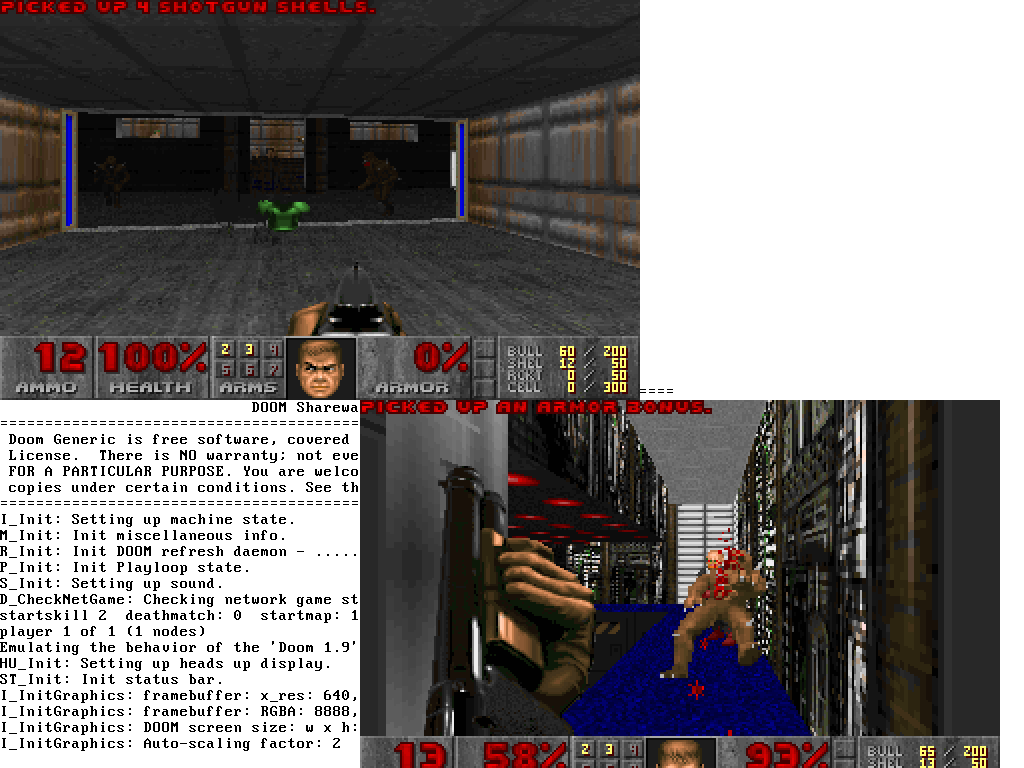
My little operating system Soso is finally able to run Doom :)

https://github.com/ozkl/soso

It is a 32 bit x86 OS with multitasking support.
Doom runs on mmap'ed framebuffer device (/dev/fb0).
All the data is in initrd which is mounted as a FAT32 image (yes, it supports VFS and FAT32).

By the way, I found very hard to implement pseudo TTY system (master and slave devices) and supporting VT-100 like terminals. So i went my own poor way :)

Here two doom processes are running in different TTYs on the same framebuffer device.

Image
ComputerFido
Member
Member
Posts: 44
Joined: Fri Sep 09, 2016 5:52 pm
Location: Australia
Contact:

Re: What does your OS look like? (Screen Shots..)

Post by ComputerFido »

The 32-bit version of my Operating System:
Image

Currently working on a 64-bit version and I am planning to go full 64, but there is not much to see.
adamfc2000
Posts: 6
Joined: Thu Apr 06, 2017 2:59 pm

Re: What does your OS look like? (Screen Shots..)

Post by adamfc2000 »

Not much, but after coming back to my bootloader project, I got memory detection working (I think!)
Attachments
memMap.png
ajaymt
Posts: 1
Joined: Tue Jul 30, 2019 4:24 am
Libera.chat IRC: ajaymt

Re: What does your OS look like? (Screen Shots..)

Post by ajaymt »

This is Mako. I've been working on it for the last ~6 months, and it I think it finally does enough to be a real "operating system"[1].

https://github.com/AjayMT/mako

Image

Huge thanks to the OSDev community for all the help and resources, I never thought I would be able to do anything like this. My operating system is not complete or perfect (and likely never will be) but I'm proud of it nevertheless. I feel like I can build literally anything now that I've done this.

[1]: It reads and writes files and runs user programs.
User avatar
eekee
Member
Member
Posts: 960
Joined: Mon May 22, 2017 5:56 am
Location: Kerbin
Discord: eekee
Contact:

Re: What does your OS look like? (Screen Shots..)

Post by eekee »

@ajaymt: Always good to see alternative window management! It looks really nice, too. A small note of caution though: I've used a system which fades the text in non-current windows, like yours does. While it's great that it shows so clearly which is the current window, it becomes a bad thing when you're trying to read documentation or notes in one window while typing into another. Also, it's confusing when a window holds a program which doesn't fade.
Kaph — a modular OS intended to be easy and fun to administer and code for.
"May wisdom, fun, and the greater good shine forth in all your work." — Leo Brodie
User avatar
saltlamp
Member
Member
Posts: 50
Joined: Tue Dec 11, 2018 3:13 pm

Re: What does your OS look like? (Screen Shots..)

Post by saltlamp »

Mine is a 86-DOS clone, with a 32-bit kernel 'overlay'.

The system starts in real-mode, with the files 'IO.SYS', and 'RMDOS.SYS', and the user can choose to boot into the 32-bit system (doskrnl.exe - microkernel), or remain in 16-bit RMDOS (execution monitor).

doskrnl.exe is loaded exactly past 1MB, while rmdos.sys and io.sys remain in conventional memory, along with the PC-BIOS. if the user is in the 32-bit system, if they run a .com file, the system goes back to real-mode, runs the .com file or 16-bit .exe file, and then goes back to the protected-mode system.

I don't have any pictures of it running, atm, but I have this screenshot of a sorta 'pseudo disk layout':
Attachments
Capture.PNG
Korona
Member
Member
Posts: 1000
Joined: Thu May 17, 2007 1:27 pm
Contact:

Re: What does your OS look like? (Screen Shots..)

Post by Korona »

LAI's hardware support gets better and better. Here is @Matt8898 from GitHub who implemented a few missing opcodes and successful booted LAI on his "laptop".

(For those who don't know about it already, LAI is an AML interpreter: https://github.com/qword-os/lai)
Attachments
DSC_0547.JPG
managarm: Microkernel-based OS capable of running a Wayland desktop (Discord: https://discord.gg/7WB6Ur3). My OS-dev projects: [mlibc: Portable C library for managarm, qword, Linux, Sigma, ...] [LAI: AML interpreter] [xbstrap: Build system for OS distributions].
Post Reply